



![Headshot of the client associated with the [Lancer agrico] project by Zero Designs](https://www.zerodesigns.in/assets/uploads/2025/03/06-Swapnil-Patel.webp)











- 25 Aug 2026
How to choose web hosting company for your website Guide for Beginners ?
WRITTEN BY

Dattatrey Vora
SEO & Hosting Expert

Choosing the right web hosting company is one of the most important decisions when building a website. Your hosting provider directly impacts your website’s speed, performance, security, and overall user experience.
For beginners, the wide range of hosting options can feel overwhelming. Understanding what to look for can help you make a smart and long-term decision.
- The right hosting provider plays a key role in ensuring consistent website performance
- Speed, uptime, and support are key factors to consider
- The right hosting plan should match your website needs
- Good hosting improves both user experience and SEO
What is Web Hosting?
Web hosting is a service that allows your website to be accessible on the internet and supports your overall Website Development process. Hosting companies store your website data on servers and make it available to users through the web.
A good hosting service ensures that your website loads quickly, remains secure, and stays online without interruptions.
These files can include:
- Website pages
- Images and videos
- CSS and JavaScript files
- Databases
- Application files
- Documents and other digital content
In simple terms:
Domain = Your website’s address
Hosting = The server where your website lives
Website = The content and functionality users access
For example, if your domain is the address of your business, hosting is similar to the physical space where your business operates.
A reliable hosting environment helps ensure that your website is available, secure, and capable of handling its expected traffic.
💡 DID YOU KNOW?
Did you know that even a one-second delay in page load time can significantly impact user engagement and conversion rates?
Key Factors in Choosing the Right Web Hosting Company
Performance and Speed
Website loading speed directly impacts how users interact with your site. A slow website can lead to higher bounce rates and lower engagement. Choose a hosting provider that offers fast loading speeds and optimized servers.
Uptime Reliability
Uptime indicates how consistently your website remains available to users. A good hosting provider should offer at least 99.9% uptime to ensure your website remains available to users.
Customer Support
Technical issues can arise at any time. Reliable customer support ensures that problems are resolved quickly without affecting your website performance.
Scalability and Flexibility
As your website expands, its hosting requirements will evolve. A scalable hosting environment ensures your site continues to perform smoothly, which also supports consistent UI UX Design as new features and content are added.
Security Features
Security is critical, especially for business websites. Look for features like SSL certificates, regular backups, and protection against cyber threats.
Which Type of Hosting Is Right for Your Website?
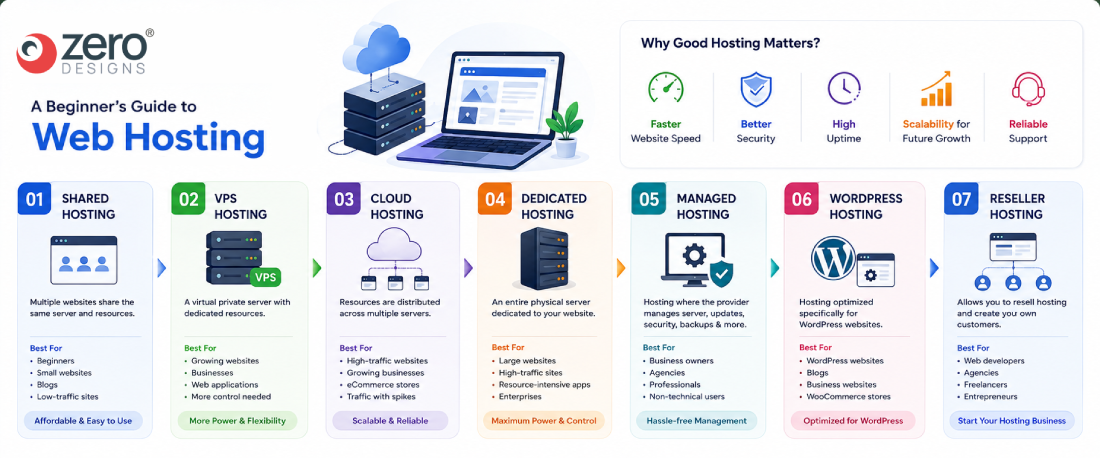
| Hosting Type | Best For | Cost | Performance | Scalability |
|---|---|---|---|---|
| Shared Hosting | Personal websites, blogs, small businesses | Low | Basic–Good | Limited |
| VPS Hosting | Growing businesses, professional websites | Medium | Good–High | Good |
| Cloud Hosting | Growing/high-traffic websites | Medium–High | High | Excellent |
| Dedicated Hosting | Large businesses, high-traffic websites | High | Very High | Excellent |
| Managed Hosting | Businesses that don’t want to manage servers | Medium–High | Depends on provider | Good |
| WordPress Hosting | WordPress websites | Low–Medium | Optimized | Good |
Common Mistakes Beginners Should Avoid
Choosing Based Only on Price
Low-cost hosting may seem attractive, but it often comes with limitations in speed, support, and reliability.
Ignoring Future Needs
Many beginners choose basic plans without considering future growth, which can lead to migration issues later.
Overlooking Support Quality
Good support is essential, especially if you are not technically experienced.
Which Type of Hosting Is Best for You?
There is no single hosting solution that is best for every website.
Your decision should depend on your website’s size, traffic, technical requirements, budget, security needs, and expected growth.
| Website or Business Type | Recommended Starting Point |
|---|---|
| Personal Blog | Shared / WordPress Hosting |
| Portfolio Website | Shared Hosting |
| Small Business Website | Shared / Managed Hosting |
| Startup Website | Shared / VPS depending on requirements |
| Corporate Website | Managed / VPS / Cloud |
| eCommerce Website | VPS / Cloud / Managed Hosting |
| High-Traffic Website | Cloud / Dedicated |
| Web Application | VPS / Cloud |
| Enterprise Website | Cloud / Dedicated / Custom Infrastructure |
| Web Development Agency | VPS / Reseller / Cloud |
These are general recommendations. Actual requirements depend on traffic, application architecture, resource usage, security requirements, and expected growth.
Does Web Hosting Affect Website Speed?
Yes, hosting can affect website performance.
However, hosting is only one part of the equation.
Website speed can also depend on:
- Website code
- CMS
- Plugins
- Database performance
- Image sizes
- JavaScript
- CSS
- Caching
- CDN configuration
- Server location
- Third-party scripts
A powerful hosting server cannot completely compensate for poorly optimized website code.
For the best results, hosting and website optimization should work together.
Does Web Hosting Affect SEO?
Hosting can indirectly influence SEO through technical performance factors.
For example, poor hosting can contribute to:
- Slow response times
- Frequent downtime
- Poor user experience
- Server errors
Search engines evaluate many factors, so hosting should not be viewed as a direct SEO ranking shortcut.
Instead, consider hosting part of your website’s overall technical SEO and performance infrastructure.
What Security Features Should You Look For?
Security should be a major consideration when choosing hosting.
Look for features such as:
SSL/TLS
Encrypts communication between the visitor’s browser and your website.
Automated Backups
Backups provide a recovery option if files or databases are damaged or compromised.
Malware Protection
Some hosting providers offer malware scanning and detection.
Firewall Protection
Firewalls can help block unauthorized or malicious traffic.
Server Monitoring
Monitoring can help identify infrastructure or performance problems.
Software Updates
Keeping server software and applications updated can reduce security risks.
Remember that hosting security is a shared responsibility. Website owners also need to keep CMS software, plugins, themes, applications, passwords, and access controls secure.
How Important Is Server Location?
Server location can affect network latency.
If most of your website visitors are located in India, for example, choosing infrastructure geographically closer to your primary audience can help reduce network latency.
However, server location is only one factor.
CDNs, caching, network quality, application architecture, and website optimization can also significantly affect performance.
Do You Need a CDN?
A CDN, or Content Delivery Network, distributes cached website content through servers located in different geographic regions.
A CDN can help deliver static resources such as images, CSS, JavaScript, and other files closer to users.
A CDN can be particularly useful for websites with:
- Visitors from multiple countries
- Large media files
- High traffic
- Performance requirements
However, not every small website necessarily needs a sophisticated CDN setup.
When Should You Upgrade Your Hosting?
You may need to consider upgrading when you consistently experience:
- Slow server response
- Resource limitations
- Frequent downtime
- Database performance problems
- Traffic-related performance issues
- CPU or memory limitations
- Increased application requirements
Do not upgrade simply because your website has become older.
Upgrade when your actual resource requirements justify it.
Web Hosting Checklist for Beginners
Before buying a hosting plan, ask these questions:
- What type of website am I building?
- How much traffic do I expect?
- Where are my visitors located?
- How much storage do I need?
- How much bandwidth might I use?
- Do I need WordPress-specific hosting?
- Do I need managed hosting?
- What security features are included?
- Are automatic backups included?
- What uptime commitment is offered?
- Is SSL included?
- Is technical support available 24/7?
- What is the renewal price?
- Can I upgrade later?
- Is website migration supported?
- Are there restrictions on CPU, RAM, databases, or files?
If you can answer these questions, you will have a much better idea of what type of hosting you need.
Choosing a Hosting Partner That Supports Your Growth
A good web hosting provider should do more than just host your website. It should offer reliable performance, scalable plans, and consistent technical support to help your website grow without disruptions.
Look for a hosting partner that prioritizes uptime, provides timely assistance, and offers flexible upgrade options so your website can adapt as your business expands.
Conclusion
Selecting the right web hosting company is not just about getting your website online—it’s about ensuring performance, security, and long-term growth.
By focusing on key factors like speed, uptime, support, and scalability, beginners can make informed decisions and build a strong foundation for their online presence.
What should beginners look for in a web hosting company?
What should beginners look for in a web hosting company?
Beginners should focus on key factors like speed, uptime reliability, customer support, security features, and scalability. A good hosting provider should offer easy setup, user-friendly dashboards, and reliable performance to ensure your website runs smoothly without technical complications.
How does web hosting affect website speed and performance?
How does web hosting affect website speed and performance?
Web hosting directly impacts how fast your website loads and performs. A high-quality hosting provider uses optimized servers and resources, ensuring faster loading times, better user experience, and improved SEO rankings, while poor hosting can cause slow speeds and frequent downtime.
What is uptime and why is it important in web hosting?
What is uptime and why is it important in web hosting?
Uptime refers to the percentage of time your website is accessible online. A reliable hosting company should offer at least 99.9% uptime. High uptime ensures your website remains available to users consistently, preventing loss of traffic, leads, and credibility.
Which type of web hosting is best for beginners?
Which type of web hosting is best for beginners?
Shared hosting is usually the best option for beginners because it is affordable and easy to manage. It provides sufficient resources for small websites and allows users to get started without requiring advanced technical knowledge.
How important is customer support in web hosting?
How important is customer support in web hosting?
Customer support is crucial, especially for beginners who may face technical issues. A good hosting provider offers 24/7 support through chat, email, or phone, helping resolve problems quickly and ensuring your website stays functional without long interruptions.
Should I choose a hosting provider based only on price?
Should I choose a hosting provider based only on price?
No, choosing a hosting provider based only on price can lead to poor performance and limited features. It is better to evaluate value, including speed, uptime, support, and security, to ensure your website performs well in the long run.
Can I upgrade my hosting plan as my website grows?
Can I upgrade my hosting plan as my website grows?
Yes, most hosting providers offer scalable plans that allow you to upgrade resources as your website grows. Choosing a flexible hosting company ensures smooth transitions without downtime or complex migrations when your traffic increases.